

Codex Reborn · Player guide
Buy points with Phantom
Buy USDC, receive it in your own Phantom wallet, then choose a point pack in your Codex account. Start with your country so you know which exchange and network to use.
A funded Phantom wallet can buy points with zero SOL. Exchange withdrawals, wallet swaps and other transfers have their own fees.
Before you start
Create your Codex Reborn account, verify your email and check Game Access. Your game account must be ready before you can purchase. Check the receiving game on Buy Points. Points are credited to that game's account.
Find a funding route for your country
Choose where you live. Your language setting does not decide which exchanges you can use.
Complete the provider's identity checks and confirm your account can withdraw to your own wallet. First purchases and new addresses can have waiting periods.
United StatesCoinbase · Kraken
Eligible customers can buy USDC with USD and withdraw over Solana. On Coinbase, open USDC and choose Send. On Kraken, open Portfolio → Withdraw → USDC. Paste your Phantom Solana address and explicitly select Solana.
New York needs a separate check. Coinbase documents no multi-network support there, and Kraken excludes New York and Maine. Confirm a permitted Solana withdrawal route before funding. Card or bank deposits may have a hold.
South KoreaCoinone
Verify your Coinone account and linked bank account, deposit KRW, then buy USDC. Coinone lists USDC on Solana (SPL) and accepts Phantom in its personal-wallet list. In 입출금, choose USDC → 출금 and your Phantom Solana address.
Follow Coinone's address-book and ownership checks if requested. Its MetaMask quick-registration flow covers EVM networks only. Use the documented Phantom address process for Solana. The current withdrawal quote decides the fee and minimum.
Supported networksOfficial instructionsEligibility and limits
TaiwanMAX by MaiCoin
Complete MAX identity and bank verification, deposit TWD and obtain USDC through the available trading or conversion pair. In your USDC wallet, choose withdrawal and Solana / SPL-USDC, then enter your Phantom Solana address.
MAX's public API currently lists Solana USDC withdrawals as enabled, with a 0.32 USDC fee and a 1 USDC minimum. Recheck the quote, including whether the fee is deducted. Verification may take several business days.
JapanSBI VC Trade → SOL → Phantom swap
SBI VC Trade currently withdraws USDC on Ethereum. We have not verified a direct domestic USDC-on-Solana route. A possible extra-step route is to buy SOL at an eligible Japanese exchange, withdraw SOL on Solana to Phantom, then swap part of it for native USDC on Solana.
Use this route only if your exchange permits the wallet withdrawal and Phantom offers the swap to you. The SOL price can move. Exchange minimums, swap fees and network fees apply. Keep enough SOL for the displayed swap fee and review the final USDC received before confirming.
In the Phantom extension, open Swap. Set You Pay to SOL and You Receive to USDC on Solana. On mobile, open USDC on Solana → Buy, then choose SOL as payment. Check the quoted amount, fees and price impact. Continue to Codex only after USDC appears in your wallet.
Supported networksOfficial instructionsPhantom swap instructions
EuropeKraken · Coinbase where available
Kraken documents service in the EEA, including Germany, and the UK. Verify your residency, fund using an available EUR or local-currency method, buy USDC, then select USDC → Withdraw → Solana and your Phantom address. Coinbase is another option where your account offers Solana withdrawals.
Europe has different country rules. Check the provider's eligibility page for your country. UK newcomers can face a 24-hour cooling-off period. Card and certain bank deposits may also delay withdrawals.
South AmericaBitso in Brazil, Argentina and Colombia
Bitso documents local-currency services in BRL, ARS and COP and supports USDC on Solana. Verify your local account, add funds, buy Digital Dollars (USDC), and choose crypto withdrawal → USDC → Solana. Enter your Phantom address and review the amount arriving.
For Chile, Peru, Uruguay and other countries, confirm a provider accepts your residency and offers USDC withdrawals on Solana before depositing. The Brazil, Argentina and Colombia route does not establish availability across the continent.
Exchange information checked 19 November 2026. Confirm the available network, fee and withdrawal time in your exchange before buying.
Cards are optional. An exchange or Phantom provider may offer debit or credit card funding in your region. Check that the purchase delivers native USDC on Solana to your regular wallet, along with the fee, minimum and withdrawal time.
Create your Phantom wallet
- Install Phantom from phantom.com/download. On desktop, use its Chrome extension. On a phone, install the iOS or Android app.
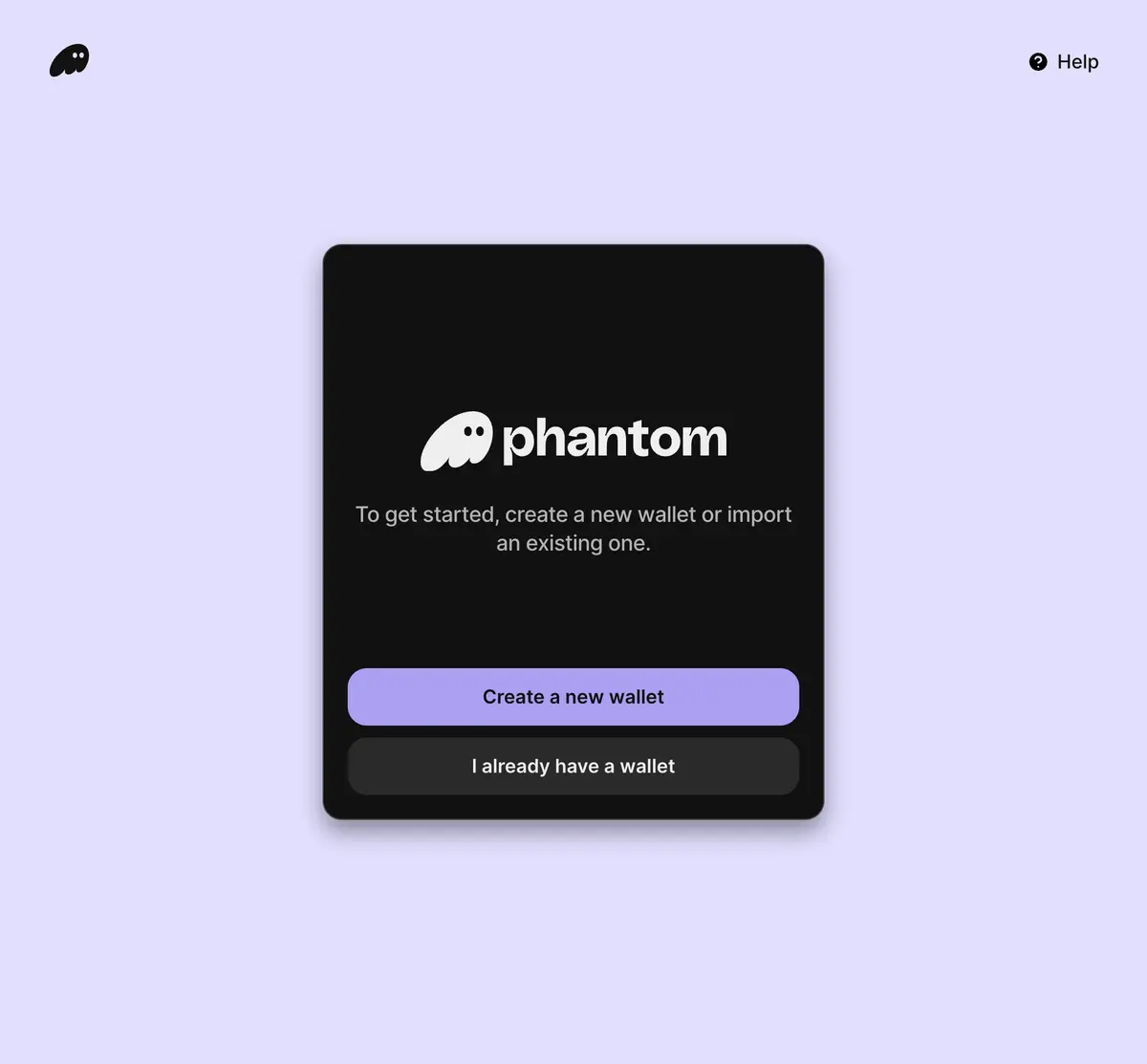
- Open Phantom and finish creating or importing a wallet. Installing the extension alone does not create one. Keep the wallet unlocked while connecting to Codex.
Save your recovery method privately. A recovery phrase belongs only in Phantom's recovery flow. Codex and support staff never need it.
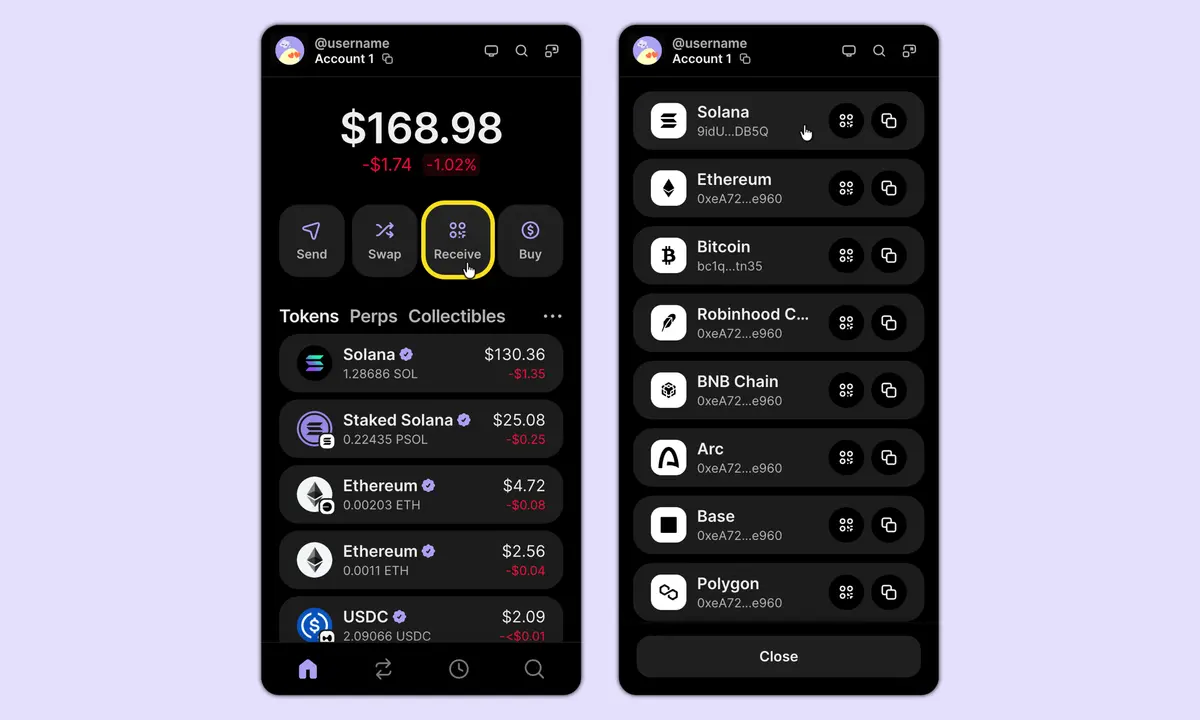
Copy your own Solana address
Desktop extension — open Receive and copy the address beside Solana.
Phone — open Deposit → Receive Crypto, then copy the Solana address for your regular wallet.
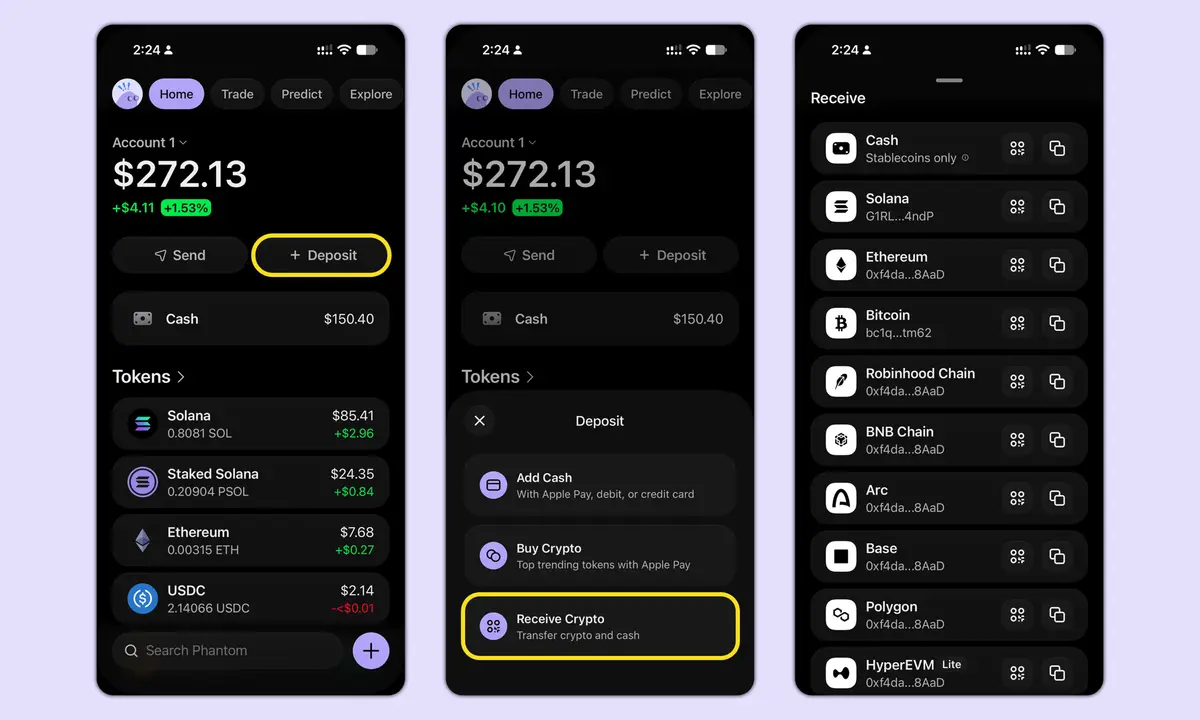
Phantom Cash has a separate address and balance. Fund the regular Solana wallet you will connect to Codex, and make sure the received token is USDC. Use the address copied from your own app.
Buy USDC and send it to Phantom
- Use the exchange route above. Before paying, check the purchase price, withdrawal minimum, fee and any withdrawal hold.
- Choose USDC as the asset and Solana (sometimes called SPL) as the network. Paste your own Phantom address and compare its beginning and end. Review the net amount arriving.
- Confirm the exchange's withdrawal security prompts. Wait for the USDC balance to appear in Phantom. A withdrawal can take longer than the blockchain transfer because the exchange processes it first.
Illustration · check these fields
- Asset
- USDC
- Network
- Solana (SPL)
- Destination
- Your own Phantom Solana address
- Amount arriving
- At least your selected pack price
For a 5 USDC pack, your wallet needs at least 5 USDC after withdrawal fees. For example, if a 1 USDC fee is deducted, withdrawing 6 USDC leaves 5 USDC. Use your exchange's actual quote.
Fund your own wallet first. To buy points, use the Codex checkout so the payment is attached to your order.
Connect, choose and approve
- Sign in at id.codexreborn.com and open Buy Points. Choose a pack and check the game receiving the points.
- Select Connect Phantom and approve the connection. Check that the displayed wallet matches the one holding your USDC.
- Select Verify wallet and prepare. Read the wallet-ownership message, check id.codexreborn.com, and sign it. This step verifies your wallet without spending tokens.
- Select Approve and the displayed USDC amount. In Phantom, check that the request comes from id.codexreborn.com and the amount matches your pack, then confirm. This approval sends the payment.
- Keep the page open for the result. If the request expires, use the retry offered by the page after it confirms the previous attempt is safe to retry.
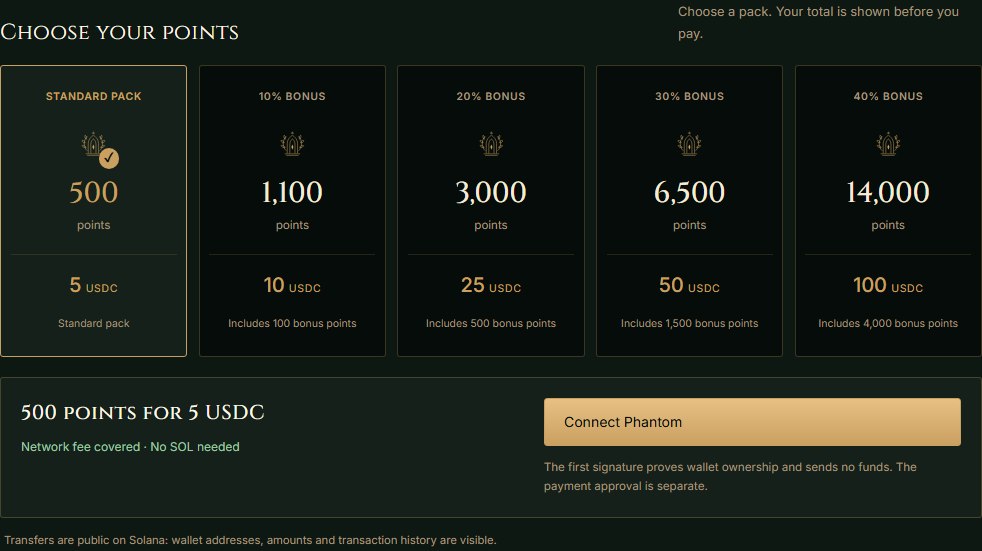
Example · 500 points for 5 USDC
Current point packs
The Buy Points page confirms the game, price and points before you pay. These are the current packs.
- 5 USDC
- 500 Points
- 10 USDC
- 1,100 Points
- 25 USDC
- 3,000 Points
- 50 USDC
- 6,500 Points
- 100 USDC
- 14,000 Points
Check your purchase
Purchase history is on the Buy Points page. Wait for Points delivered. The points are added to your existing game balance once the payment is verified. If the game still shows the old balance, log out and back in.
If a payment is pending, check its history before starting another purchase. Keep the order reference and transaction signature if you need help. Exchange withdrawals are separate from point purchases.
If something gets in the way
Phantom will not connect
Finish creating or importing your wallet, unlock it and reload Buy Points. On a phone, use Phantom's built-in browser. Reconnect with the funded account selected.
I have money in Phantom, but checkout says it is unavailable
Check the selected wallet, token and network. Checkout uses native USDC on Solana in the connected regular wallet. A Cash balance, USDT, or USDC on Ethereum or Base needs a different funding step. Consult Phantom or the exchange before moving it.
The exchange will not let me withdraw yet
Check identity verification, bank or card holds, address approval, the withdrawal minimum and network availability. The exchange's support team handles these checks.
I approved, but my points have not arrived
Return to Purchase history and check the existing order. A wallet approval can still be processing or expired. If it stays unresolved, contact account support with the order reference and transaction signature. Keep recovery phrases and private keys private.
Why is Phantom asking for SOL?
Codex sponsors its own point checkout. A separate wallet send or swap can require SOL or charge a fee in the token. Return to Buy Points for the sponsored purchase.
Buy Points is unavailable on my account
Verify your email and check Game Access. If game-account creation is still processing, wait for it to finish. Account Help explains verification and recovery.
Sources and image credits
Provider documentation establishes the routes above. Account eligibility, network maintenance, fees and screens can change. Regional exchange withdrawals have not been personally tested in every country.